

If you’re shopping for elementary school headsets, the goal is usually simple: equipment that holds up to daily handling, stays comfortable for younger learners, and works with the devices your school already uses (Chromebooks, desktops, tablets, or testing platforms).
Key Takeaways
- Durability matters most: look for reinforced cables, flexible headbands, and easy-to-clean surfaces.
- Comfort reduces friction: lightweight fit + soft cushions can help students keep headsets on during lessons.
- Choose the right connection: USB vs. 3.5mm (TRRS) depends on your device fleet and testing needs.
- Noise control helps in busy rooms: “noise-reducing” mics can make student voice clearer during calls and recordings.
- Plan for upkeep: cleaning routines + replaceable cushions/covers can extend lifespan in shared-use settings.
Why durability matters in elementary classrooms
Elementary headsets often rotate between students, move between stations, and get handled quickly during transitions. A durable design can reduce replacements over the year and keep classroom routines smoother. Many schools also prefer dependable wired options because they’re straightforward to deploy and don’t require charging.
Note: Headsets can support focus by reducing distractions for audio-based activities, but outcomes vary by classroom, students, and implementation.
Quick chooser: USB vs. 3.5mm (TRRS) for schools
| Connection | Best for | What to watch |
|---|---|---|
| USB (USB-A / USB-C) | Chromebooks/desktops, standardized labs, consistent mic behavior | Confirm your ports (USB-A vs USB-C). For mixed fleets, keep adapters on hand. |
| 3.5mm TRRS | Tablets, older laptops, multi-device flexibility | Some devices require TRRS for mic support. Avoid TRS-only plugs if you need a mic. |
Need help matching devices?
If you’re not sure what your students use most, start with your device list (Chromebook model, tablet type, testing platform) and we can help you choose the best connection type for your classroom.
What to look for in elementary school headsets
Durability
Reinforced cable points, flexible headbands, and tough plastics reduce breakage during daily use.
Comfort
Soft cushions and an adjustable headband help younger students wear headsets longer without constant readjusting.
Microphone quality
A “noise-reducing” mic can help student voices come through more clearly during calls, read-alouds, and recordings.
Easy cleaning
Wipeable surfaces and simple storage routines help keep shared headsets in better condition.
Three durable headset picks (classroom-proven categories)
Below are three practical options that cover the most common elementary classroom scenarios: USB labs, 3.5mm mixed-device setups, and a budget-friendly everyday headset.
1) USB option for computer-based classrooms
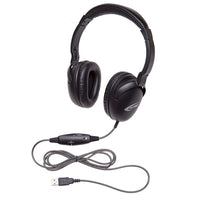
Califone NeoTech Plus USB Headset — a solid fit for labs and Chromebooks where USB is the standard.
- USB connection for straightforward plug-and-play on compatible devices
- Comfort-oriented fit for longer lessons
- Mic designed for clearer student voice in digital activities
2) 3.5mm (TRRS) option for mixed devices
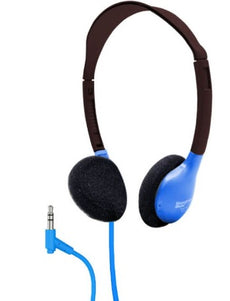
Califone NeoTech Headset (3.5mm TRRS) — a practical choice when your classrooms use multiple device types.
- 3.5mm connection that can work across many devices (confirm TRRS if you need mic support)
- Comfort-focused padding for younger learners
- Mic support for speaking activities, recordings, and calls (device dependent)
3) Budget-friendly everyday headset for schools
If you need a value-forward option for larger rollouts, the Advanced School Headset can be a strong starting point—especially when you’re equipping multiple stations and need a simple, functional classroom headset.
- Designed for school environments and routine use
- Comfortable adjustable fit for student head sizes
- Good general-purpose choice for blended learning activities
Hygiene and shared-use maintenance (simple routines)
Shared classroom headsets stay in better shape with a consistent routine: quick wipe-downs, basic cable care, and storage that prevents tangles.
- Clean regularly: Use school-safe cleaning methods that match your district policy and the headset materials.
- Teach handling: Show students how to remove by the headband and avoid yanking cords.
- Store consistently: Hooks, bins, or labeled stations reduce drops and cable stress.
- Plan for wear items: Cushions and covers are common maintenance points in high-use classrooms.
Helpful maintenance collections
If you’re managing shared equipment, these pages can help keep things organized:
Bulk buying: how to reduce replacements over the year
The lowest sticker price isn’t always the lowest total cost. For shared classrooms, durability and comfort can reduce breakage and “non-use” friction. If you’re outfitting multiple rooms, it often helps to standardize one or two models by connection type.
Conclusion
Choosing the right elementary headset comes down to durability, comfort, and device compatibility. Start by confirming whether your classrooms are mostly USB or 3.5mm, then select a school-ready option that matches your daily use patterns and maintenance plan.
If you share your device mix and approximate quantities, we can help you narrow down the best-fit models.
0 comments